
Provider-led CPD
Provider-led CPD is any learning delivered by GOC-approved CPD providers.
For most registrants, at least half your points total should come from provider-led CPD.
Searching for provider-led CPD
Registrants can search for provider-led CPD through their MyCPD accounts.
To do this, login to MyCPD and select either ‘Search CPD’ from the header menu or the ‘Search’ tile on the MyCPD homepage.
You will then be taken to the Search for CPD page which has a number of different options:
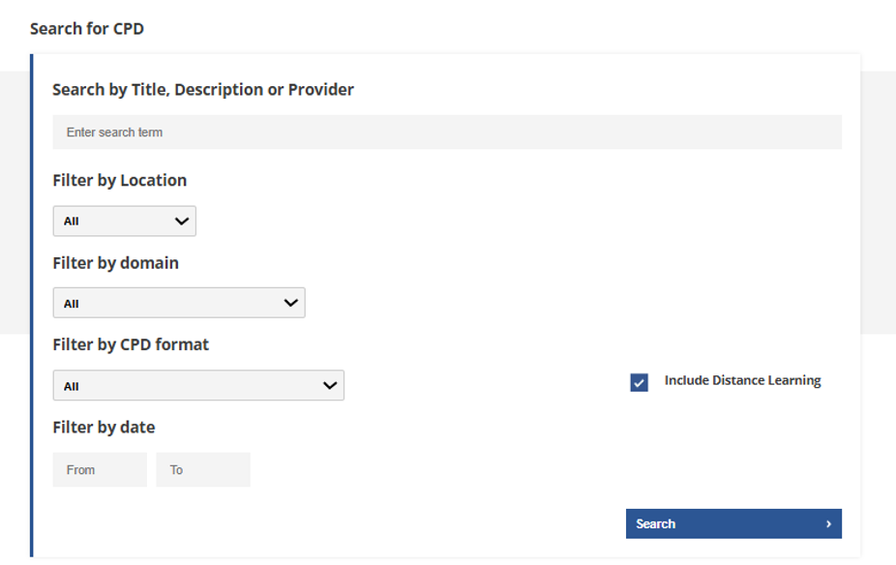
Search by Title, Description or Provider – here you can search keywords related to your learning and development needs. Examples might include ‘glaucoma’, ‘contact lenses’, ‘communication’, ‘leadership’.
Refining your search
MyCPD has several filters you can use to allow you to refine your results further.
Filter by location – search for activities taking place in a particular geographic location.
Filter by domain – search for activities aligned to a particular CPD domain. The domains are professionalism, communication, clinical practice, and leadership and accountability. Registrants with a specialty also have a specialty-specific domain.
Filter by CPD format - search for activities delivered in a specific format, such as a skills workshop or provider-led peer review.
Filter by date – search for activities taking place at a particular time
Include Distance Learning – select this option if you would like to include online or remote learning activities in your search results.
Search tips
-
Use simple keywords rather than full sentences
-
Try alternative search terms if your first search returns limited results
-
Consider broadening or removing filters if you receive few results
-
Different providers may use different terminology, so it can be helpful to try related keywords